Hard Drive Disc Sander
Here's a quick and dirty demonstration of turning an old hard drive into a very poor disc sander. It took all of twenty minutes, but don't worry: the video's been sped up considerably. Hope you like it!
It's already a good year for the small R&D team I work with: we've been lucky enough to get a laser cutter to experiment with! Ours is the 40W “fifth-generation” model from Full Spectrum Laser; it can cut up to 1/4 inch wood or plastic and can engrave anodized aluminum. It also features some slick software that acts as an ordinary Windows printer driver so that you can print directly from the software of your choice (for me in this context, usually Adobe Illustrator).
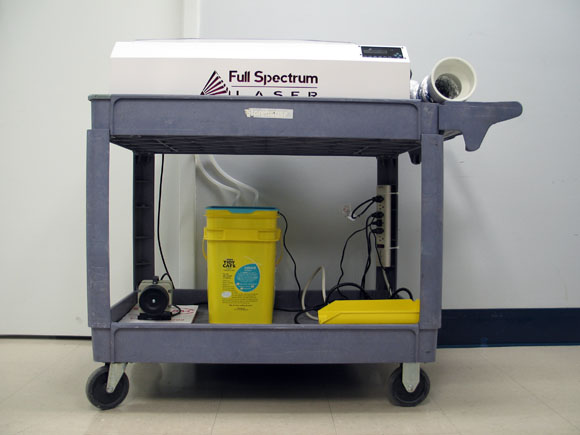
Completed laser setup
Like a lot of digital fabrication machines in the hobbyist end of the market, however, this device requires some setup to get it running. You'll want to mount the laser on a worktable or mobile cart big enough to support it and all the associated infrastructure. We equipped ours with a power strip for all the associated peripherals as well. On the left side of the photo is a small air compressor, supplied with our laser, that provides high-pressure air to the cutting head for purposes of blowing away anything that might otherwise adhere to the optics. This might also be useful in blowing out flames that may occur, which is definitely something to keep an eye on when laser cutting.
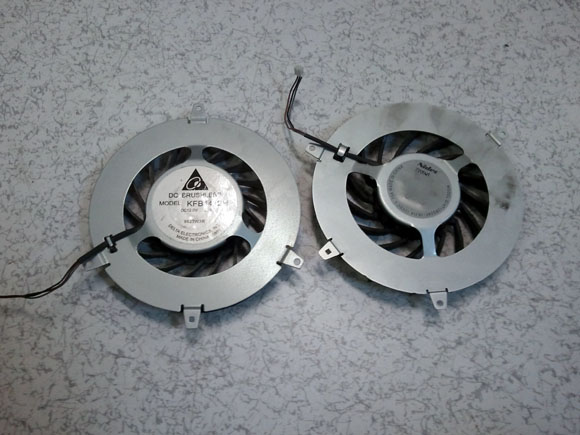
Lately I've been elbows-deep in some broken Playstation 3's and found myself wanting to test their cooling fans. These have a three-wire header with leads colored brown, black, and gray; you may be tempted to conclude that this is a brushed DC fan with a tachometer lead, but you'd be wrong. These are brushless fans, and the third wire is a PWM signal that you supply to control the speed of the fan. The two PS3s (both “fat” style) I've opened recently have compatible fans from separate manufacturers; one is a Nidec G14T12BS2AF-56J14 and the other is a Delta Electronics KFB-1412H.
Nidec and Delta models
It's not trivially easy to find datasheets for these fans, but no matter. If you just want to test them or need a good centrifugal blower for one of your own projects, do the following:
That's it!
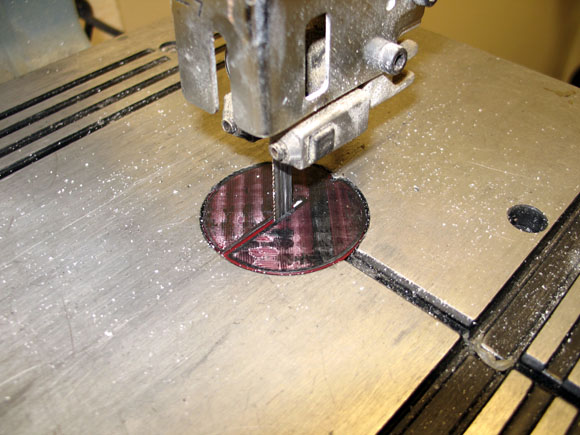
Lacking an insert plate for the 10-inch Delta bandsaw (model 28-195) at work, I made a new one out of ABS plastic using our 3D printer. Here's the result:
Rough-but-ready output from the Solidoodle
The geometry is two discs stacked on top of each other with a little bit of a cutout at the edge behind the blade, which helps prevent the insert from twisting too much. I've modeled a slot a bit larger than the kerf of the blade and included it in the printed part but you could certainly leave that off and cut the slot into the insert using the bandsaw itself, making what's called a “zero-clearance” insert.
I'm starting another AVR project using my by-now-venerable STK500 and the latest 6.1 version of Atmel's Studio software. Although I'm sure Atmel would like all developers everywhere to buy STK600s, it's perfectly possible to use the older development kit with the newest software, although this combination is not as well documented as I'd like; hence I'm using this post to collect a few tips distilled from recent experience.